Facebook Comment Export

a tool for export Facebook posts and videos comments to Excel file.

Add to Chrome (It's free)
Current version: v1.3.1, 2025-11-24
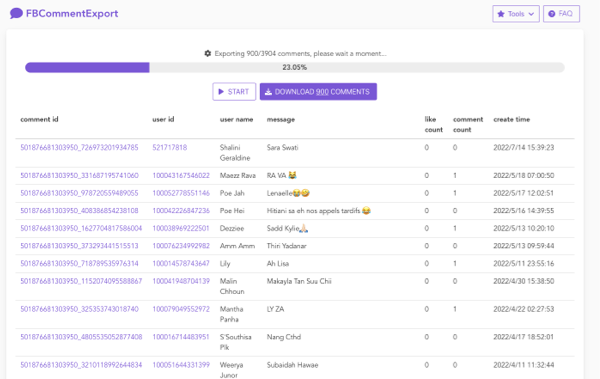
Facebook Comment Export is a tool for export Facebook comments to Excel.

Pricing

Get started for free. No credit card required, cancel anytime.

Basic

Free

per user / month
  • Export up to 10 comments.
  • Basic support
Add to chrome
Professional

$9.99 $20.00 / Month

per user / month
  • Export unlimited comments
  • Premium support
Add to chrome

100% money back guarantee.

We know you're gonna love our professional services, but let us prove it. If our service hasn't exceeded your expectations after 7 days, you'll get a full refund. Simple as that.

Get started now

FAQ

1. Open Facebook, Navigate to the Facebook post.
2. Click on the time or date of the post below the name
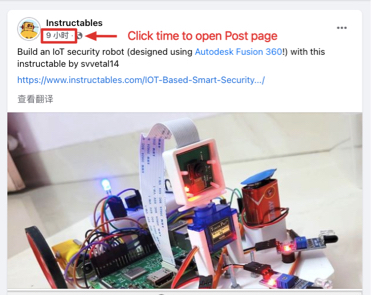
3. Copy the link from the browser address bar
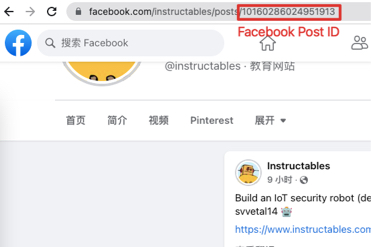
You will find a link like this: https://www.facebook.com/instructables/posts/10160286024951913 , and the post id should like 10160286024951913

What FB Comment Export can do for me?

By using FB Comment Export, You can:

  • Export Facebook posts and videos comments.
  • Export Fields: #comment id, #comment text, #username, #username id, #like count, #comment count, #permalink url, #date
  • Fast and light
Why can't the URL link I entered be recognized?

When you copy a Facebook link, make sure to use the final redirected URL, not the initial web.facebook.com link. For example:

  • If https://web.facebook.com/reel/1152818323175229 redirects to https://www.facebook.com/reel/1152818323175229, use the latter.
  • If https://web.facebook.com/TPinthePhilippines/videos/1494064828352623 redirects to https://www.facebook.com/watch/live/?ref=watch_permalink&v=1494064828352623, use the redirected URL.
  • Always check the browser's address bar after the page loads to get the correct final URL.
What is the difference between a free account and a paid user?
  • Free account can only export up to 10 comments.
  • Paid account can export Unlimited comments
How to cancel my subscription?

You can cancel your premium subscription at any time, by clicking the PRO button, and finally clicking the CANCEL SUBSCRIPTION button.

Manually install Chrome extension
1. Download extension.
2. Click on the Chrome main menu and select “Extensions” from the “More tools” option.
3. Here click on the “Developer mode” toggle at the top-right corner to enable it.
4. Now drag and drop the ZIP file of the extension in the Chrome extensions page and you’ll be asked to add the extension like you are usually asked. that's all.

Change Log

  • 1.3.1 (2025-11-24) - Added support for permalink.php URL format.
  • 1.3.0 (2025-03-17) - Fixed fb token issue.
  • 1.2.1 (2024-11-29) - Fixed instagram token.
  • 1.2.0 (2024-10-19) - Added support for reel URL format.
  • 1.1.3 (2024-04-16) - Fixed an issue with retrieving access tokens.
  • 1.1.2 (2023-11-20) - Fixed an issue where comments failed to be retrieved.
  • 1.1.1 (2023-11-20) - Fixed incorrect order of user login status retrieval. Fixed errors when retrieving ads tokens. Fixed initialization issues with m.facebook.com.
  • 1.1.0 (2023-11-09) - Fixed "too fast" error when using GraphQL by switching to the page interface.
  • 1.0.8 (2023-09-23) - Removed dependency on ads tokens.
  • 1.0.7 (2023-09-05) - Added compatibility for pfb post link formats.
  • 1.0.6 (2023-08-23) - Added optional date filtering. Fixed an issue where sub-replies were not retrieved. Added compatibility for various post ID formats. Adjusted interval time to be a time range.
  • 1.0.4 (2022-09-12) - Fixed token broadcasting issue.
  • 1.0.3 (2022-08-31) - Added automatic token synchronization.
  • 1.0.0 (2022-07-23) - Initial release.